Advertisement
+1 Speed Keyboard Lucky Escape
Played 244 times.
100% (7/7)
Advertisement
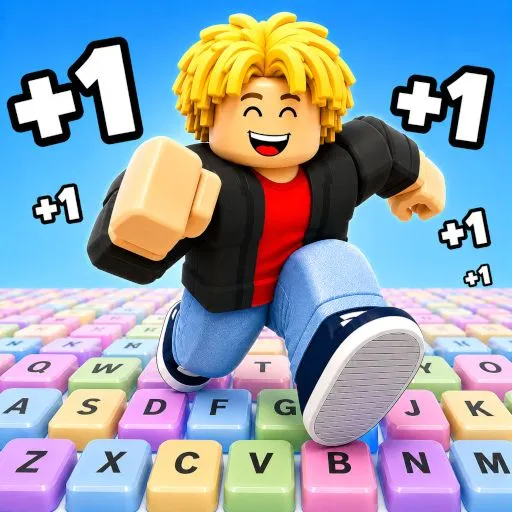
+1 Speed Keyboard Lucky Escape is a fast-paced 3D arcade game where you launch Lucky Blocks across a giant keyboard, collect bizarre Brainrot characters, increase your speed, and race back to safety before a dangerous enemy catches you.
The farther you manage to launch a Lucky Block, the better the Brainrot character you can discover. Stronger rewards also bring greater danger, so you will need speed, good timing, and upgrades if you want to escape safely.
Collect dozens of Brainrots, improve your base, unlock new weapons, earn permanent bonuses through Rebirth, and become the ultimate Brainrot collector.
Play +1 Speed Keyboard Lucky Escape online for free on SuperKidGames.com directly in your browser.
What Is +1 Speed Keyboard Lucky Escape?
+1 Speed Keyboard Lucky Escape combines collecting, upgrading, running, and escape gameplay in a colorful 3D world built around a giant computer keyboard.
Your main objective is to launch Lucky Blocks as far as possible. Depending on how far your block travels, you can discover increasingly valuable Brainrot characters.
After collecting your reward, however, you still need to make it back to the Safe Zone before Tung Tung Sahur catches you.
The stronger your collection becomes, the more you can upgrade your character and base to prepare for longer and more dangerous runs.
How to Play
Start by exploring the giant keyboard and launching a Lucky Brainrot block.
Try to send the block as far as possible because longer launches can unlock better Brainrots.
Collect +1 Speed boosts while playing to make your character faster. Extra speed becomes extremely useful when it is time to escape from enemies and return to your Safe Zone.
Bring the Brainrots you collect back to your base, upgrade them, and continue improving your abilities.
As your progress increases, you can:
Collect up to 93 different Brainrots
Improve your launch distance
Upgrade Brainrots at your base
Increase your movement speed
Unlock additional weapons
Improve your base
Use Rebirth to gain permanent bonuses
Steal characters from rival bases
Take on increasingly dangerous escape runs
The goal is to continuously improve your collection until you become one of the strongest Brainrot collectors in the game.
Lucky Blocks and Brainrots
Lucky Blocks are a major part of the game.
Launch one across the giant keyboard and see how far it travels. Greater distances can reward you with rarer and more powerful Brainrots.
There are 93 Brainrots to discover, giving you plenty of characters to collect while progressing through the game.
Finding a valuable Brainrot is only part of the challenge. You must also successfully escape and bring your rewards back to your base.
Escape From Tung Tung Sahur
Do not spend too much time away from safety.
Tung Tung Sahur can chase you while you are collecting rewards. When the chase begins, use your accumulated speed and find the fastest route back to the Safe Zone.
The better your rewards become, the more dangerous your adventures can become as well.
Knowing when to continue collecting and when to escape is an important part of surviving.
Upgrade Your Base
Your base is where much of your long-term progress takes place.
Return after successful runs to manage and upgrade the Brainrots you have collected.
Improving your collection and upgrades allows you to attempt more difficult runs and work toward unlocking better rewards.
Rebirth System
Once you have made enough progress, you can use the Rebirth system.
Rebirth allows you to restart part of your progression in exchange for permanent bonuses that can make future runs stronger.
Using Rebirth effectively can help you progress faster and reach higher-level rewards over time.
Steal Brainrots From Other Bases
You are not limited to collecting characters from Lucky Blocks.
The game also allows you to raid rival bases and steal Brainrot characters.
This adds another way to expand your collection, although entering another base can put you in a much riskier situation.
Get what you need and escape before things go wrong.
Play With a Friend
+1 Speed Keyboard Lucky Escape includes a local 2 Player mode on supported desktop devices.
Two players can share the same keyboard and play together using separate control schemes.
This makes the game suitable both for solo progression and local multiplayer sessions with a friend.
Note: Mobile devices support the 1 Player mode only.
Features
Fast-paced 3D arcade gameplay
Giant keyboard world
Lucky Block launching system
Collect 93 Brainrot characters
+1 Speed upgrades
Tung Tung Sahur escape sequences
Safe Zone gameplay
Character and base upgrades
Unlockable weapons
Rebirth system with permanent bonuses
Steal Brainrots from rival bases
Solo gameplay
Local 2 Player mode on supported desktop devices
Desktop, mobile, and tablet support
Browser-based gameplay with no download required
Tips and Tricks
Collect Speed Upgrades
Do not ignore +1 Speed bonuses. Increasing your movement speed makes escaping dangerous enemies considerably easier.
Improve Your Launch Distance
Better launch range gives you a chance to discover stronger and rarer Brainrots.
Know When to Escape
Going farther can provide better rewards, but staying outside the Safe Zone for too long can cost you the run.
Upgrade Your Brainrots
Return to your base regularly and invest in upgrades instead of simply collecting characters without improving them.
Use Sprint During Dangerous Chases
Save your sprint for situations where you need to create distance from an enemy or quickly reach the Safe Zone.
Use Rebirth for Long-Term Progress
Rebirth may reset some progression, but the permanent bonuses can make later runs much more efficient.
Explore Rival Bases Carefully
Stealing a valuable Brainrot can accelerate your collection, but do not remain inside an enemy base longer than necessary.
Can You Collect All 93 Brainrots?
Your collection starts small, but every successful Lucky Block launch can bring you closer to discovering another rare character.
Increase your speed, improve your launch power, upgrade your base, survive the chase, and use Rebirth bonuses to become stronger with every run.
Can you collect all 93 Brainrots and become the ultimate collector?
Play +1 Speed Keyboard Lucky Escape online for free on SuperKidGames.com.
Frequently Asked Questions
What is +1 Speed Keyboard Lucky Escape?
+1 Speed Keyboard Lucky Escape is a 3D arcade collecting and escape game where you launch Lucky Blocks, discover Brainrot characters, collect speed upgrades, improve your base, and escape from dangerous enemies.
How many Brainrots are in +1 Speed Keyboard Lucky Escape?
There are 93 Brainrots available to collect.
What does +1 Speed do?
Speed boosts increase how quickly your character can move, helping you explore and escape from enemies more effectively.
What happens when I launch a Lucky Block?
The distance your Lucky Block travels influences the quality of the Brainrot you can discover. Longer launches can provide better rewards.
What is Rebirth?
Rebirth is a progression system that lets you restart part of your progress in return for permanent bonuses that make future runs stronger.
Can I play +1 Speed Keyboard Lucky Escape with a friend?
Yes. The game includes a local 2 Player mode on supported desktop devices, allowing two players to share one keyboard.
Can I play +1 Speed Keyboard Lucky Escape on mobile?
Yes. The game supports mobile browsers with touchscreen controls. However, mobile devices only support the 1 Player mode.
Can I play on PC?
Yes. You can play directly in a desktop web browser using keyboard controls.
Do I need to download the game?
No. +1 Speed Keyboard Lucky Escape runs directly in your browser, so no installation is required.
Is +1 Speed Keyboard Lucky Escape free?
Yes. You can play +1 Speed Keyboard Lucky Escape online for free on SuperKidGames.com.
The farther you manage to launch a Lucky Block, the better the Brainrot character you can discover. Stronger rewards also bring greater danger, so you will need speed, good timing, and upgrades if you want to escape safely.
Collect dozens of Brainrots, improve your base, unlock new weapons, earn permanent bonuses through Rebirth, and become the ultimate Brainrot collector.
Play +1 Speed Keyboard Lucky Escape online for free on SuperKidGames.com directly in your browser.
What Is +1 Speed Keyboard Lucky Escape?
+1 Speed Keyboard Lucky Escape combines collecting, upgrading, running, and escape gameplay in a colorful 3D world built around a giant computer keyboard.
Your main objective is to launch Lucky Blocks as far as possible. Depending on how far your block travels, you can discover increasingly valuable Brainrot characters.
After collecting your reward, however, you still need to make it back to the Safe Zone before Tung Tung Sahur catches you.
The stronger your collection becomes, the more you can upgrade your character and base to prepare for longer and more dangerous runs.
How to Play
Start by exploring the giant keyboard and launching a Lucky Brainrot block.
Try to send the block as far as possible because longer launches can unlock better Brainrots.
Collect +1 Speed boosts while playing to make your character faster. Extra speed becomes extremely useful when it is time to escape from enemies and return to your Safe Zone.
Bring the Brainrots you collect back to your base, upgrade them, and continue improving your abilities.
As your progress increases, you can:
Collect up to 93 different Brainrots
Improve your launch distance
Upgrade Brainrots at your base
Increase your movement speed
Unlock additional weapons
Improve your base
Use Rebirth to gain permanent bonuses
Steal characters from rival bases
Take on increasingly dangerous escape runs
The goal is to continuously improve your collection until you become one of the strongest Brainrot collectors in the game.
Lucky Blocks and Brainrots
Lucky Blocks are a major part of the game.
Launch one across the giant keyboard and see how far it travels. Greater distances can reward you with rarer and more powerful Brainrots.
There are 93 Brainrots to discover, giving you plenty of characters to collect while progressing through the game.
Finding a valuable Brainrot is only part of the challenge. You must also successfully escape and bring your rewards back to your base.
Escape From Tung Tung Sahur
Do not spend too much time away from safety.
Tung Tung Sahur can chase you while you are collecting rewards. When the chase begins, use your accumulated speed and find the fastest route back to the Safe Zone.
The better your rewards become, the more dangerous your adventures can become as well.
Knowing when to continue collecting and when to escape is an important part of surviving.
Upgrade Your Base
Your base is where much of your long-term progress takes place.
Return after successful runs to manage and upgrade the Brainrots you have collected.
Improving your collection and upgrades allows you to attempt more difficult runs and work toward unlocking better rewards.
Rebirth System
Once you have made enough progress, you can use the Rebirth system.
Rebirth allows you to restart part of your progression in exchange for permanent bonuses that can make future runs stronger.
Using Rebirth effectively can help you progress faster and reach higher-level rewards over time.
Steal Brainrots From Other Bases
You are not limited to collecting characters from Lucky Blocks.
The game also allows you to raid rival bases and steal Brainrot characters.
This adds another way to expand your collection, although entering another base can put you in a much riskier situation.
Get what you need and escape before things go wrong.
Play With a Friend
+1 Speed Keyboard Lucky Escape includes a local 2 Player mode on supported desktop devices.
Two players can share the same keyboard and play together using separate control schemes.
This makes the game suitable both for solo progression and local multiplayer sessions with a friend.
Note: Mobile devices support the 1 Player mode only.
Features
Fast-paced 3D arcade gameplay
Giant keyboard world
Lucky Block launching system
Collect 93 Brainrot characters
+1 Speed upgrades
Tung Tung Sahur escape sequences
Safe Zone gameplay
Character and base upgrades
Unlockable weapons
Rebirth system with permanent bonuses
Steal Brainrots from rival bases
Solo gameplay
Local 2 Player mode on supported desktop devices
Desktop, mobile, and tablet support
Browser-based gameplay with no download required
Tips and Tricks
Collect Speed Upgrades
Do not ignore +1 Speed bonuses. Increasing your movement speed makes escaping dangerous enemies considerably easier.
Improve Your Launch Distance
Better launch range gives you a chance to discover stronger and rarer Brainrots.
Know When to Escape
Going farther can provide better rewards, but staying outside the Safe Zone for too long can cost you the run.
Upgrade Your Brainrots
Return to your base regularly and invest in upgrades instead of simply collecting characters without improving them.
Use Sprint During Dangerous Chases
Save your sprint for situations where you need to create distance from an enemy or quickly reach the Safe Zone.
Use Rebirth for Long-Term Progress
Rebirth may reset some progression, but the permanent bonuses can make later runs much more efficient.
Explore Rival Bases Carefully
Stealing a valuable Brainrot can accelerate your collection, but do not remain inside an enemy base longer than necessary.
Can You Collect All 93 Brainrots?
Your collection starts small, but every successful Lucky Block launch can bring you closer to discovering another rare character.
Increase your speed, improve your launch power, upgrade your base, survive the chase, and use Rebirth bonuses to become stronger with every run.
Can you collect all 93 Brainrots and become the ultimate collector?
Play +1 Speed Keyboard Lucky Escape online for free on SuperKidGames.com.
Frequently Asked Questions
What is +1 Speed Keyboard Lucky Escape?
+1 Speed Keyboard Lucky Escape is a 3D arcade collecting and escape game where you launch Lucky Blocks, discover Brainrot characters, collect speed upgrades, improve your base, and escape from dangerous enemies.
How many Brainrots are in +1 Speed Keyboard Lucky Escape?
There are 93 Brainrots available to collect.
What does +1 Speed do?
Speed boosts increase how quickly your character can move, helping you explore and escape from enemies more effectively.
What happens when I launch a Lucky Block?
The distance your Lucky Block travels influences the quality of the Brainrot you can discover. Longer launches can provide better rewards.
What is Rebirth?
Rebirth is a progression system that lets you restart part of your progress in return for permanent bonuses that make future runs stronger.
Can I play +1 Speed Keyboard Lucky Escape with a friend?
Yes. The game includes a local 2 Player mode on supported desktop devices, allowing two players to share one keyboard.
Can I play +1 Speed Keyboard Lucky Escape on mobile?
Yes. The game supports mobile browsers with touchscreen controls. However, mobile devices only support the 1 Player mode.
Can I play on PC?
Yes. You can play directly in a desktop web browser using keyboard controls.
Do I need to download the game?
No. +1 Speed Keyboard Lucky Escape runs directly in your browser, so no installation is required.
Is +1 Speed Keyboard Lucky Escape free?
Yes. You can play +1 Speed Keyboard Lucky Escape online for free on SuperKidGames.com.
Instructions:
Controls
Player 1
WASD – Move
Space – Jump
Left Shift – Sprint
Tab or E – Launch Lucky Brainrot
E – Interact
Q – Upgrade Brainrot at your base
T – Open the Rebirth menu
Player 2
Player 2 mode is available on supported non-Chromebook desktop devices.
Arrow Keys – Move
L – Jump
K – Sprint
U – Launch Lucky Brainrot
O – Interact
U – Upgrade Brainrot
Y – Open the Rebirth menu
Mobile Controls
Joystick – Move
Jump Button – Jump
Sprint Button – Sprint
Launch Button – Launch a Lucky Brainrot
Tap – Interact with menus and interface elements
Only 1 Player mode is available on mobile devices.
Player 1
WASD – Move
Space – Jump
Left Shift – Sprint
Tab or E – Launch Lucky Brainrot
E – Interact
Q – Upgrade Brainrot at your base
T – Open the Rebirth menu
Player 2
Player 2 mode is available on supported non-Chromebook desktop devices.
Arrow Keys – Move
L – Jump
K – Sprint
U – Launch Lucky Brainrot
O – Interact
U – Upgrade Brainrot
Y – Open the Rebirth menu
Mobile Controls
Joystick – Move
Jump Button – Jump
Sprint Button – Sprint
Launch Button – Launch a Lucky Brainrot
Tap – Interact with menus and interface elements
Only 1 Player mode is available on mobile devices.
Categories:
NEW GAMES






RANDOM GAMES






Advertisement